
Scholarship management
Run a multi-stage scholarship program — from custom application form to award letter — without spreadsheets or third-party tools.
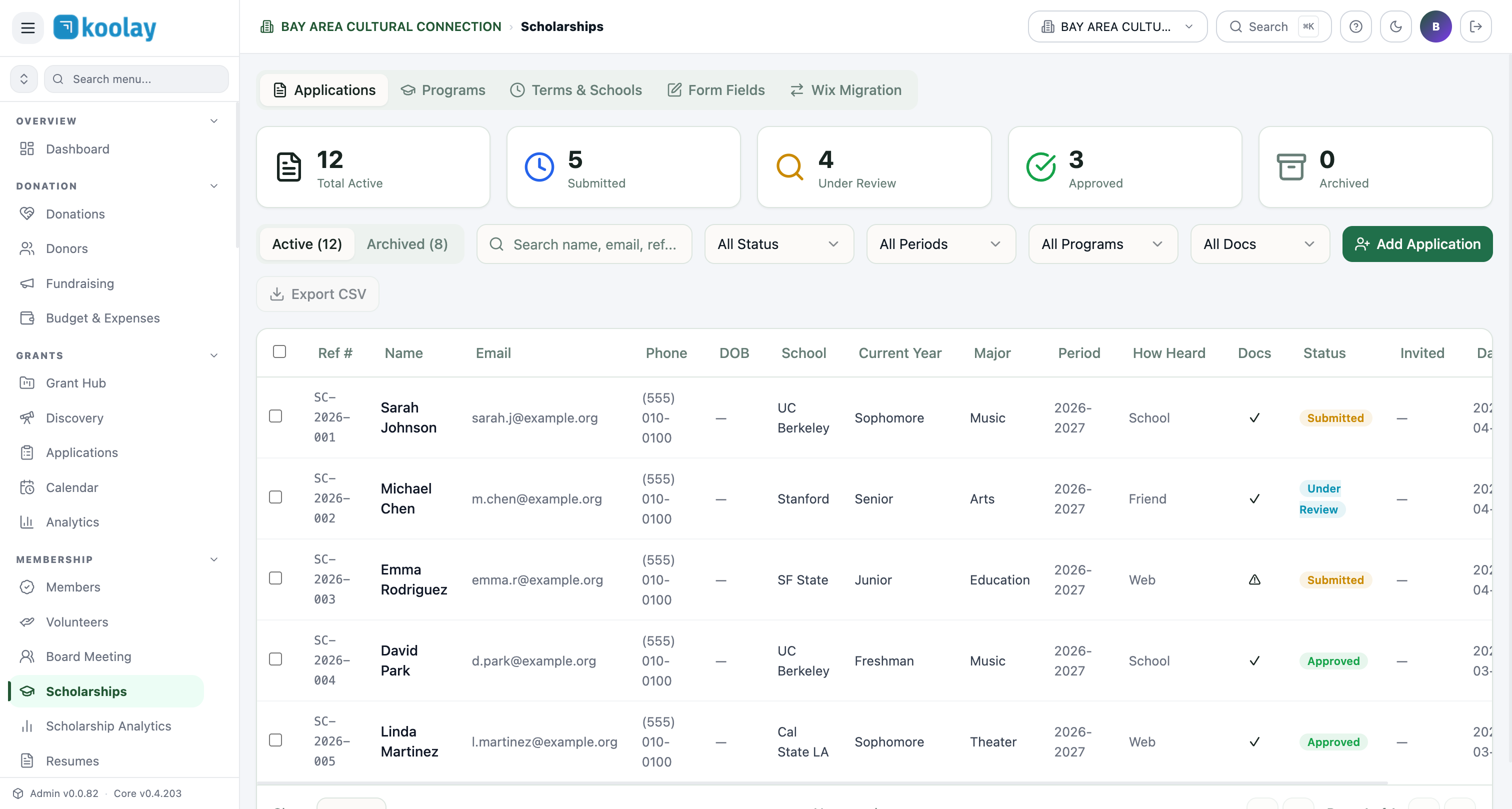
The five tabs
- Applications — applicant database.
- Programs — your scholarship programs (you can run several simultaneously).
- Terms & Schools — academic terms and partner institutions.
- Form Fields — custom field definitions for the application form.
- Wix Migration — for nonprofits migrating from Wix-based scholarship forms.
Programs
Each scholarship program has its own application form, criteria, and awarding pipeline:
- Name (e.g. "Academic Excellence Scholarship 2026").
- Award amount ($2,500–$5,000 typical).
- Application window — open and close dates.
- Eligibility — published criteria displayed to applicants.
- Required documents — transcripts, letters, essays.
- Reviewers — staff who score applications.
Application form
The public form (/scholarships) shows all open programs. Applicants:
- Choose a program.
- Fill out the form.
- Upload documents.
- Submit.
Form is built with Form Fields — drag/drop the standard fields (name, email, phone, school, GPA, major, essay) plus any custom ones.
Application stages
Applications move through:
Submitted → Under Review → Approved / Rejected → Awarded → Completed- Submitted — applicant clicked submit; awaiting first review.
- Under Review — assigned to a reviewer.
- Approved — passed review; pending decision.
- Rejected — denied (with optional reviewer notes).
- Awarded — selected as scholarship recipient.
- Completed — funds disbursed; case closed.
Reviewing applications
Each application opens to a workspace with:
- All submitted form fields.
- Document downloads.
- Score field (1–10) — multiple reviewers possible, scores averaged.
- Internal notes (visible to reviewers, not applicants).
- Status dropdown to advance stage.
Awarding
When you advance an application to Awarded:
- Auto-email goes to the applicant (customizable template).
- Award letter PDF generated.
- Disbursement task created in Project Management Hub.
Reports for funders
Many scholarship-funding grants require reports on recipients. Generate from Scholarship Analytics:
- Total applications received.
- Acceptance rate.
- Recipient demographics (age, school, geography).
- Per-program breakdown.
Export to CSV or PDF.
Resumes
If your scholarship form requires a resume upload, the Resumes panel collects all uploaded resumes in one searchable place — useful for partner programs ("send us your top 10 candidates' resumes") or when matching scholars to internship opportunities.
Common patterns
- Two-stage review — first pass eliminates ineligible; second pass scores qualified candidates.
- Anonymous review — hide applicant names from reviewers to reduce bias. Toggle in the program settings.
- Multi-year disbursement — for renewable scholarships ($5K/year for 4 years), use Project Management Hub to schedule annual disbursement tasks.