
Email campaigns & drip
Koolay's email system has three modes: newsletters (one-time blast), drips (multi-email sequences), and transactional (system emails like donation receipts). This page covers the first two.
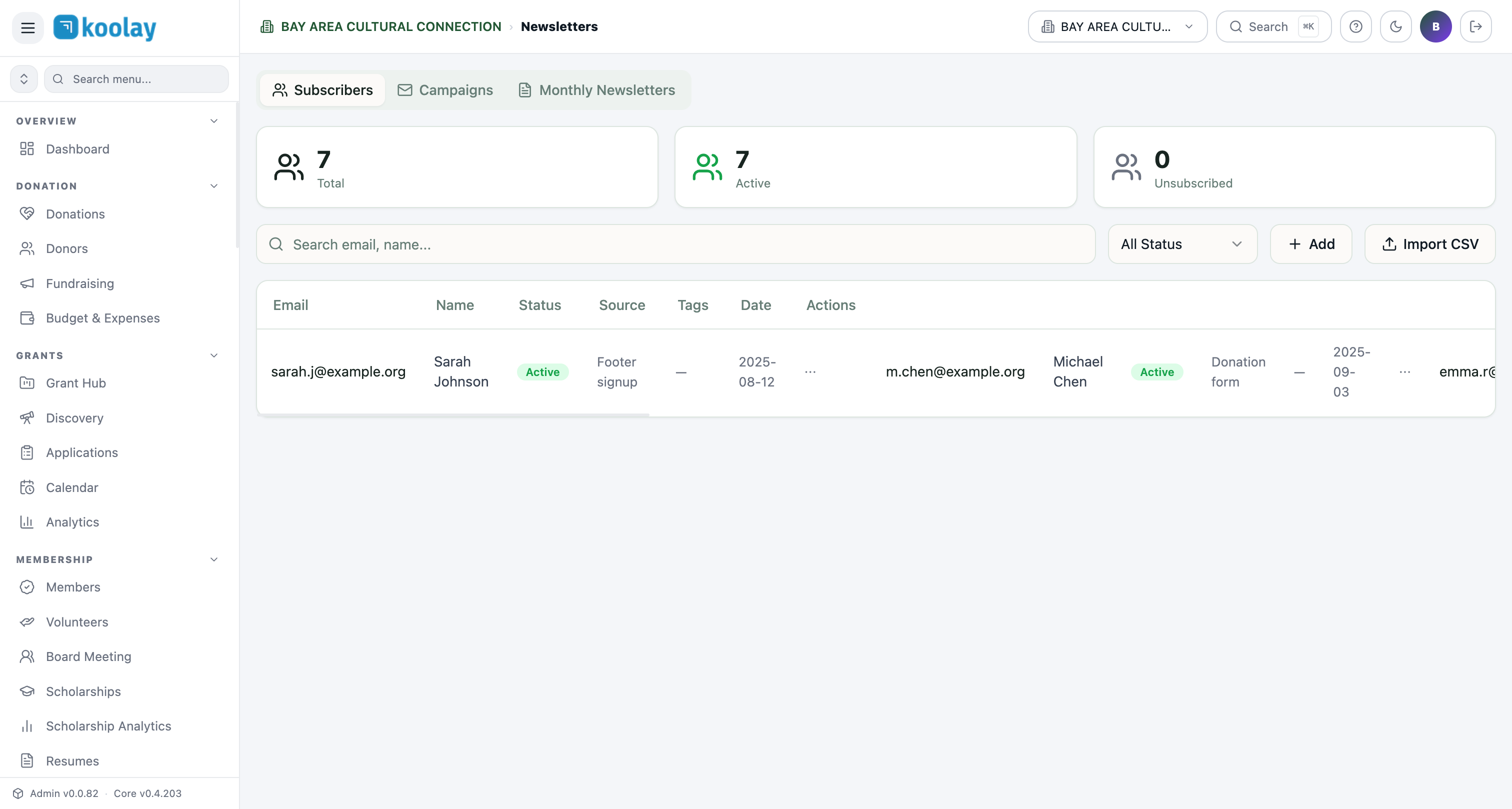
Subscribers
The Newsletters → Subscribers view lists everyone signed up for your email list. Each row shows email, name, status, source (where they signed up), tags, signup date.
Subscribers come from:
- Footer signup on your public site.
- Donation form (opt-in checkbox).
- Event RSVP (opt-in checkbox).
- Newsletter widget embedded on landing pages.
- Manual add by admin.
- CSV import for migrating from another system.
Status
- Active — currently subscribed.
- Unsubscribed — clicked unsubscribe; never gets emails again.
- Bounced — email bounced repeatedly; auto-removed.
- Complained — marked your email as spam; auto-removed and flagged.
Newsletter campaigns
Send a one-time email to a list segment:
- New campaign → name + subject + sender.
- Audience — pick a tag, segment, or full list.
- Content — drag-and-drop email builder with text, image, button, divider blocks.
- Preview — see how it renders in major email clients.
- Test send — to yourself first, always.
- Schedule — send now or pick a date/time.
After sending, you'll see opens, clicks, unsubscribes, bounces.
Drip sequences
Drips are automated multi-email sequences triggered by an event. Common drips:
- Welcome series — 3 emails over 14 days for new newsletter subscribers.
- Donor onboarding — 5 emails over 30 days after first donation.
- Lapsed donor reactivation — 3 emails to donors who haven't given in 12+ months.
- Member renewal — 3 reminders before annual renewal date.
Set up in Email Drips:
- Trigger — what event starts the sequence (newsletter signup, first donation, etc.).
- Steps — add emails with delays (e.g. "Day 0", "Day 3", "Day 14").
- Audience filter — only people matching X criteria.
- Activate.
Drips run in the background; subscribers progress through them automatically.
Email templates
Save reusable templates in Email Templates to avoid rebuilding from scratch. Useful for:
- Branded headers/footers consistent across all emails.
- Common layouts (text-only newsletter, image-heavy announcement, donation appeal).
Deliverability
Koolay uses authenticated sending domains (SPF, DKIM, DMARC) so your emails land in inboxes, not spam.
If you have a custom domain (yourorg.org), set up email auth in Settings → Domain → Email. Without this, emails come from noreply@koolay.com instead of your domain — works, but less professional.
Compliance
- CAN-SPAM — every email automatically includes an unsubscribe link and your physical address (set in Organization Profile).
- Unsubscribes are honored — once unsubscribed, a person cannot be re-added without their explicit re-opt-in.
- GDPR — for EU subscribers, consent records are stored per subscriber.
Common patterns
- Send Tuesday morning — 10–11am local time generally has best open rates.
- Subject line is 80% of opens — A/B test subjects when you can.
- Don't email more than weekly — even if you have content, fatigue kicks in fast.
- Segment your list — donors, members, and newsletter-only subscribers want different things.