
Discovery — finding funders & RFPs
Where the Grant Hub shows funders matched to your projects, Discovery is the global opportunity browser. Search across every active RFP and IRS-enriched funder in our database.
Not on GrantHub Lite. The standalone Discovery panel is a paid feature and is hidden on the free Lite tier. Lite still searches the same opportunity database through AI matching in the Grant Hub — you just see grants matched to your profile instead of the full unfiltered browser. See GrantHub Lite.
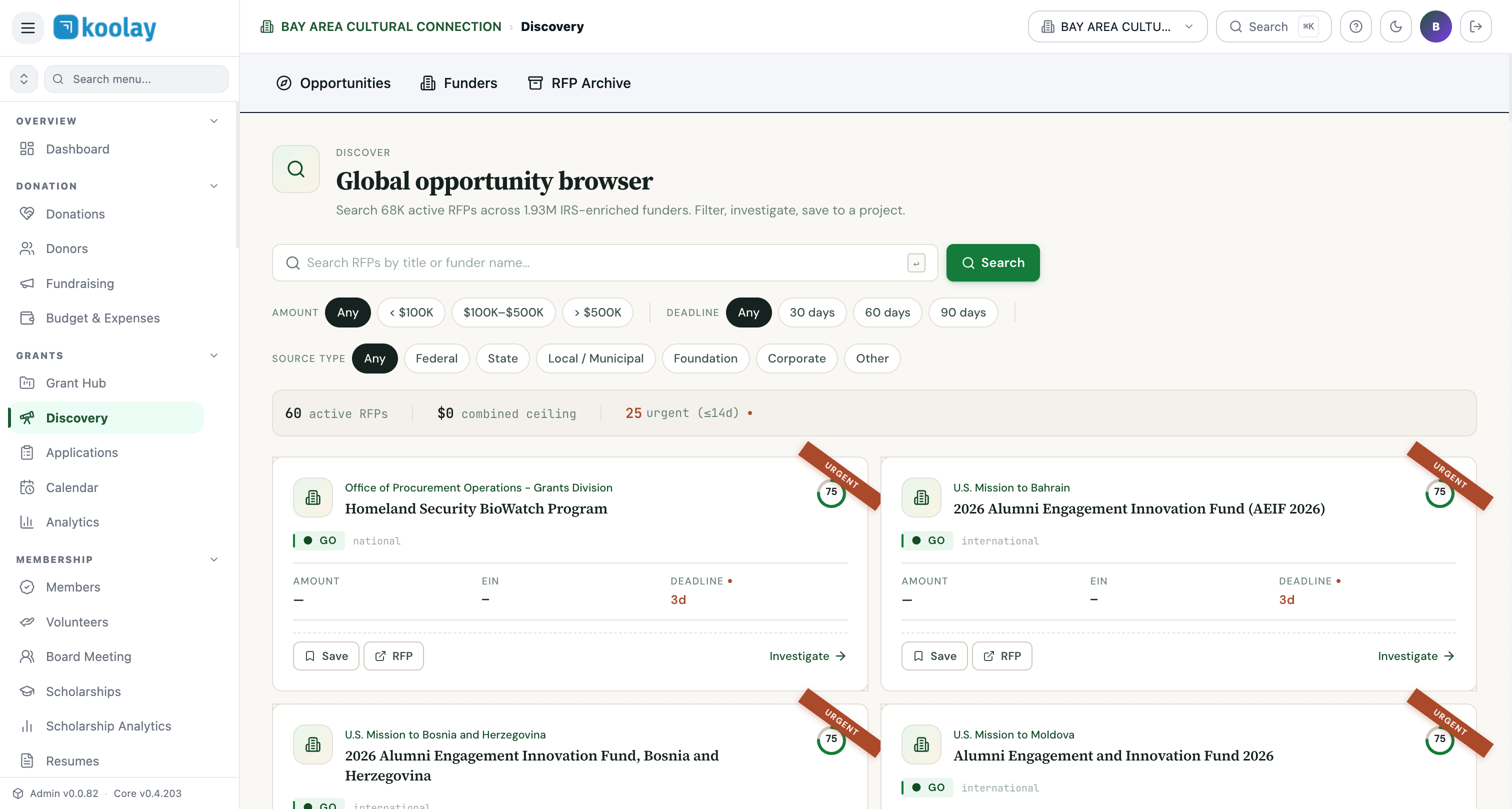
Three sub-views
Toggle at the top:
- Opportunities — active grant RFPs (federal, state, local, foundation).
- Funders — IRS-enriched 501(c)(3) foundations, 184K of them, drawn from our 1.9M nonprofit DB.
- RFP Archive — historical federal awards, useful for "who funded this kind of project before?"
Filters
The toolbar has three filter axes:
- Amount — Any, <$100K, $100K–$500K, >$500K. Filter to your typical ask range.
- Deadline — Any, 30/60/90 days. Helpful when you need a quick win.
- Source type — Federal, State, Local/Municipal, Foundation, Corporate.
Anatomy of an opportunity card
Each card shows:
- URGENT badge — appears when deadline is ≤14 days.
- Funder/agency name — clickable to the funder profile.
- Title — clickable to the original source (Grants.gov or Federal Register).
- Fit score — relative to your tenant's NTEE/geo profile.
- Source label —
GO= Grants.gov,FR= Federal Register,FDN= foundation. - Geographic scope — national, international, or specific state(s).
- Amount — if disclosed.
- EIN — for foundation sources.
- Deadline — days remaining.
Card actions:
- Save — pushes this RFP into one of your projects (you pick which).
- RFP — opens the original posting on Grants.gov or Federal Register.
- Investigate — opens the funder's full IRS profile, past grantees, and a recommended letter-of-intent draft.
Stats banner
Top of the list shows:
- Total active RFPs matching your filters.
- Combined ceiling (sum of all max-amounts).
- Urgent count (≤14 days).
Tips
- Use the search box generously — keyword search hits both title and funder name. Try "scholarship", "youth", "music", whatever describes your work.
- Save liberally — saving an RFP to a project costs nothing and lets you decide later. Dismiss only when you're certain it's not a fit.
- Check daily for federal RFPs — Grants.gov posts new opportunities every weekday morning. The first to apply often has an edge.
- Federal opportunities have short windows — most federal RFPs give 30 days from posting to deadline. If you see one you want and it's already 7 days in, move fast.