
Page Hub
The Page Hub is where you manage every single-instance page on your public site — your homepage, landing pages, About page, hero carousel slides, announcement banners, and the structural building blocks that hold them together.
It lives under Content → Page Hub in the sidebar.
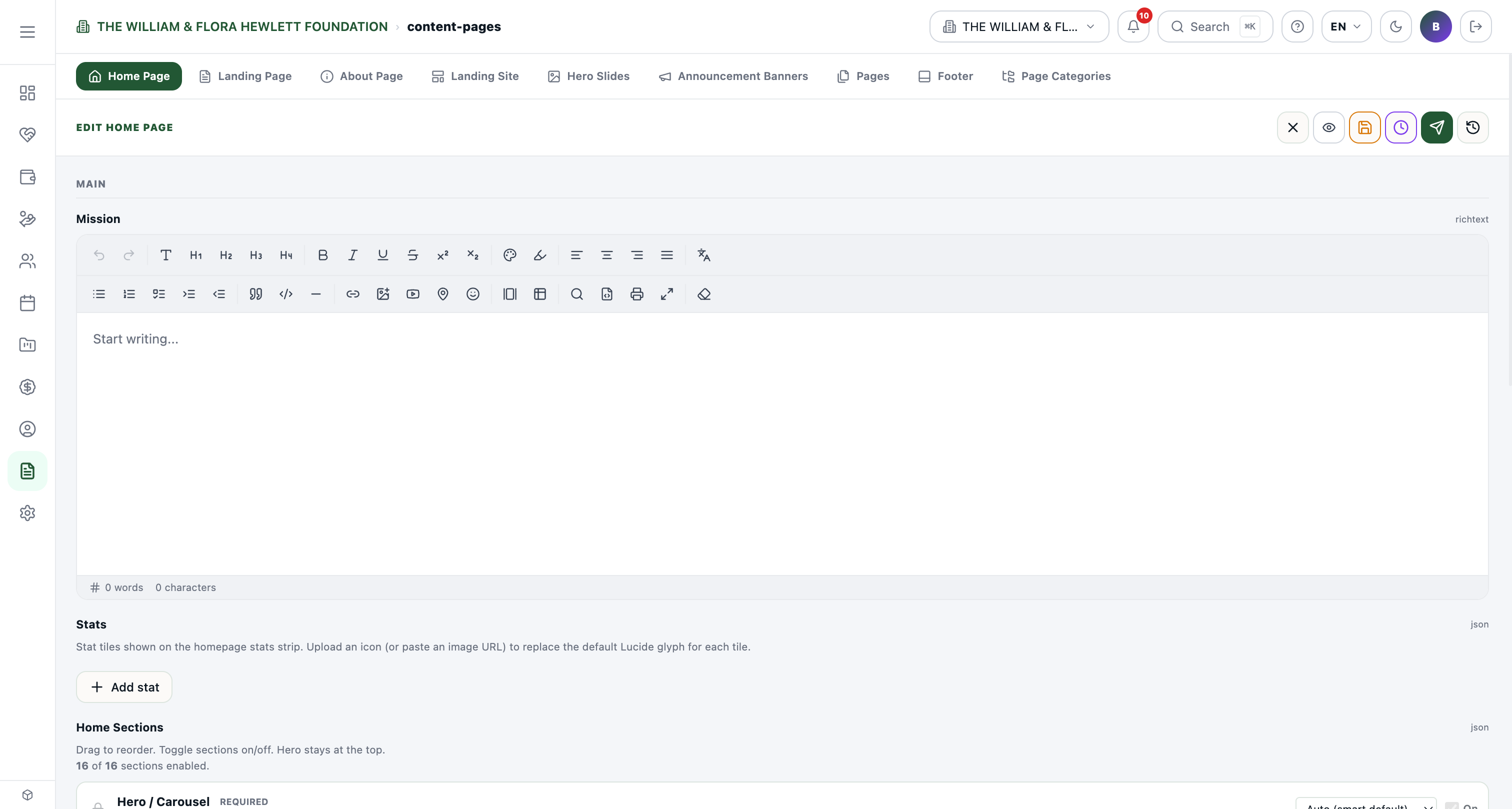
What's inside
The Page Hub is a tabbed panel. Each tab edits a different page or page-related content type. You can switch between them without losing your place.
| Tab | What it controls |
|---|---|
| Home Page | Your public homepage (/). Mission statement, stat tiles, and the 16 home sections you can drag-reorder and toggle on/off (Hero, Quick Donate, Featured Campaign, Programs, Upcoming Events, etc.). |
| Landing Page | A campaign-style landing page used for paid traffic or specific calls to action. |
| About Page | Your "About / Our Story" page (/about). |
| Landing Site | The single-page micro-site shown to QUICKSITE-style tenants. |
| Hero Slides | Image / video slides that rotate in the homepage Hero section. Add captions, CTA buttons, and pick the slide order. |
| Announcement Banners | Site-wide banners at the top of every public page (e.g. "Spring grants now open"). |
| Pages | Free-form CMS pages — any page that isn't a singleton. Use this for legal, FAQ, or other one-off content. |
| Footer | Edits the global footer content shown on every public page. |
| Page Categories | Categories used to group /pages (e.g. Programs, Legal). |
The Home Page editor
Home is the most-used tab. It has three things you can edit:
- Mission (rich text) — A short paragraph rendered in the homepage mission section.
- Stats — Numbered tiles ("12K students served", "$1.2M raised"). You can swap the icon, edit the number and label, and rearrange the tiles.
- Home Sections — Sixteen pre-built building blocks (Hero, Quick Donate, Featured Campaign, Our Mission, Impact in Numbers, Scholarship Programs, Our Programs, Past Events, Upcoming Events, Volunteer Opportunities, Reviews, Latest Blog Posts, Partners & Sponsors, Newsletter Signup, HTML/Widget Embed, Photo Gallery).
For each section you can: - Toggle it On or Off (Hero is always on). - Drag to reorder. - Pick a background tone (Auto / Default / Muted / Primary tint / Dark / Image). - Click ⚙ to open the section's settings (where applicable).
The preview on the public site refreshes automatically when you save.
Tips
- Singleton pages are pre-created. Home, Landing, About, Landing Site, and Footer all exist from day one — you can't delete them, only edit their contents.
- Hero Slides and Announcement Banners are collections. Add as many as you like, set start/end dates, and they rotate or expire automatically.
- Page Categories show up in the public nav. If you create a category like Programs and assign Pages to it, those pages get grouped under a "Programs" drop-down on your site nav (depending on your menu setup).
- Search and pin still work. Even though Pages, Galleries, etc. no longer appear as individual sidebar items, you can search for them in the sidebar search box (e.g. type "Hero Slides") and the result jumps you straight to the tab.