
Grants Hub
The Grants Hub is your project-centric console for finding funders, drafting proposals, and tracking applications across their entire lifecycle. It's powered by AI matching across our 1.9M nonprofit DB + 184K funders and Grants.gov RFPs, with 29,000+ live grant opportunities to browse.
On GrantHub Lite (free tier): the Hub works, with caps — up to 10 projects, 10 active applications, and 50 saved grants — and the AI Writer is not included. See GrantHub Lite.
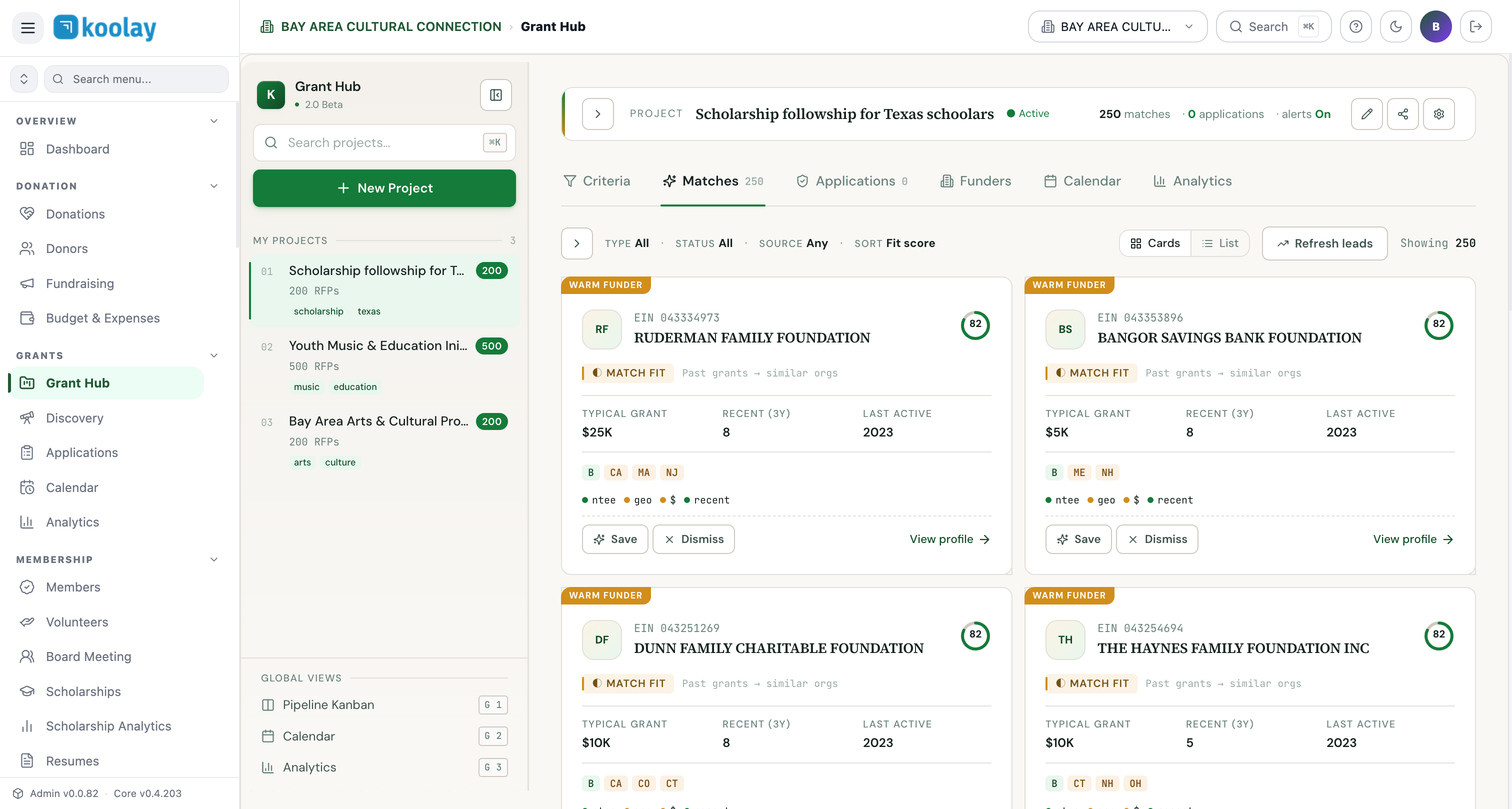
What a "project" is in Grants Hub
A project is your strategic container — not a single application. A project carries the criteria the AI uses to find matching funders:
- Focus areas (arts, education, health, etc.)
- Geographic scope (Bay Area, statewide, national)
- Budget range (typical ask, ceiling)
- Eligibility filters (NTEE codes, recipient type)
- Tags
You'll usually have a small number of projects — one per program area or major initiative — each producing many applications over time.
The five tools inside a project
The right pane of an open project has five tabs:
- Criteria — your matching rules. Edit these any time and the AI re-scores warm funder leads.
- Matches — the AI-ranked list of funders likely to fund your work. Each card shows EIN, fit score (0–100), past grants pattern, geographic alignment, typical grant size, and recent activity.
- Applications — every application you're working on for this project, grouped by stage.
- Funders — saved funders (your tracker for "we're cultivating this funder").
- Calendar — every deadline, milestone, and decision date for this project's pipeline.
- Analytics — win rate, awarded YTD, pipeline value, application funnel — scoped to this project.
The match fit score
Each suggested funder gets a fit score 0–100 computed from:
- NTEE alignment — does this funder give to your program type?
- Geographic alignment — does the funder give in your area?
- Grant-size alignment — is your typical ask in their typical-grant range?
- Recent activity — has the funder filed a 990 in the last 3 years?
Funders scoring 80+ are strong matches; below 50 typically aren't worth your time.
Saving and dismissing
Every match card has three actions:
- Save — bookmarks the funder to your tracker (Funders tab).
- Dismiss — hides this funder from the project's matches forever.
- View profile — opens the full IRS-enriched profile (990 history, board members, past grantees, address).
Global views
Below your projects in the left sidebar:
- Pipeline Kanban — all applications across all projects, in stage columns.
- Calendar — every deadline across every project.
- Analytics — org-wide grant performance.
Where Grants Hub ends and Project Management Hub begins
Grants Hub covers everything up to award: discovering, deciding, drafting, submitting. Once a grant is awarded, it crosses into Project Management Hub for execution: tasks, budget spend-down, reporting.
The handoff is automatic — when you mark an application Awarded, a project is auto-created in Project Management Hub, pre-populated with the budget, deadlines, and reporting cadence from the grant.
Common patterns
- One project per program area — typically 3–5 active projects per nonprofit.
- Refresh leads weekly — the Refresh leads button re-scores using the latest 990 data; new funders may have appeared since you last looked.
- Investigate before applying — before drafting, click View profile to see if the funder has a recent connection to similar orgs.