
Project Management Hub
The Project Management Hub is where awarded grants and other initiatives go to be delivered. Think of it as your nonprofit's project management system — but already wired up to your grants, donors, members, and reporting.
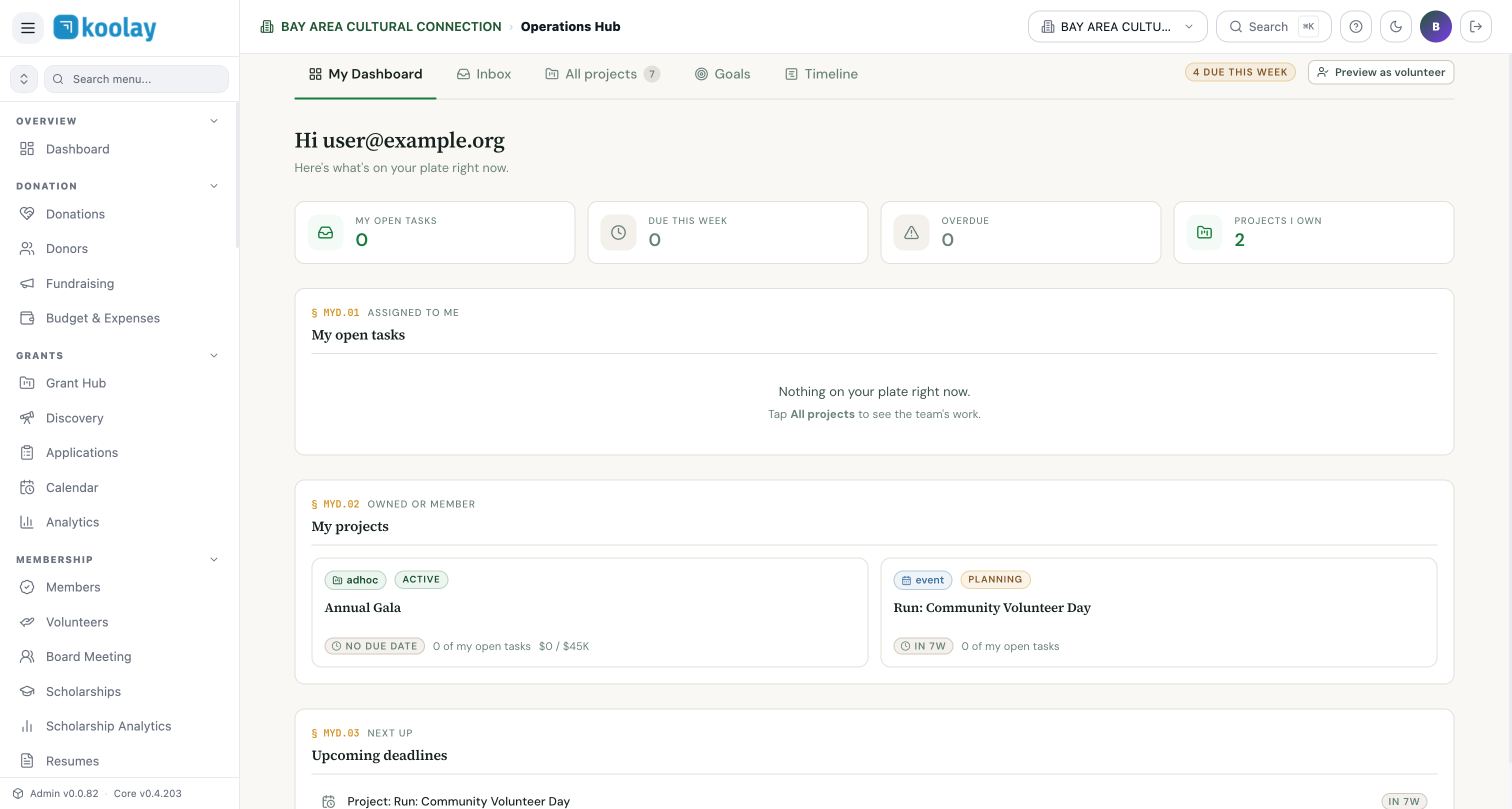
My Dashboard — the morning view
The default view shows what's on your plate:
- My open tasks — every task assigned to you, sorted by due date.
- Due this week — tasks due in the next 7 days.
- Overdue — things that should already be done.
- Projects I own — projects where you're the lead.
Use this every morning. If your day is shaped by what you should be working on, this is your daily check-in.
Inbox
A unified feed of mentions, comments, task assignments, and status changes. Don't lose track of "who said what" across many projects.
All projects
Every project, regardless of who owns it. Filter by:
- Status (active, planning, completed, on hold)
- Type (grant-funded, event, ongoing program, ad-hoc)
- Owner
- Department
Project types
- Grant-funded — auto-created when an application is Awarded. Carries budget, period of performance, reporting requirements.
- Event — created from an event in Events Hub when execution requires multiple people and tasks.
- Ongoing program — your standing programs (e.g. weekly mentoring, monthly community dinner).
- Ad-hoc — anything else: a website redesign, a strategic planning offsite, a board recruiting drive.
Project workspace
Open any project to see its workspace:
- Overview — status, owner, members, key dates, budget summary.
- Tasks — list, kanban, or calendar view of every task.
- Timeline — Gantt-style timeline of milestones.
- Budget — expenses against budget, spend-down rate, remaining funds.
- Team — who's on the project, their role, recent activity.
- Reports — for grant projects: interim and final reports queued by funder requirements.
- Activity — full audit log.
Goals
Org-wide goals (annual fundraising target, scholarship recipient count, volunteer hours target). Each goal links to projects that contribute toward it. Progress rolls up automatically.
Timeline
A high-level Gantt across all projects. Best for board presentations: "here's what we're working on this quarter."
Cross-tenant collaboration
If you've grouped multiple tenants under an Organization, you can create projects that span tenants — useful when a parent org and a fiscally-sponsored project share work.
When to use Project Management Hub vs. just Tasks
If a piece of work has only 1–3 tasks, just use the task list directly. Project Management Hub really earns its keep when:
- Work spans multiple weeks or months.
- More than 2 people are involved.
- There's a budget to track.
- There's a deliverable due to a funder, board, or external party.
For everything below that bar, the Tasks panel is enough.