
Donations Hub
The Donations Hub is where every donation your nonprofit receives lives — Stripe charges, PayPal, Zelle, manual bank-statement imports, even checks you typed in by hand.
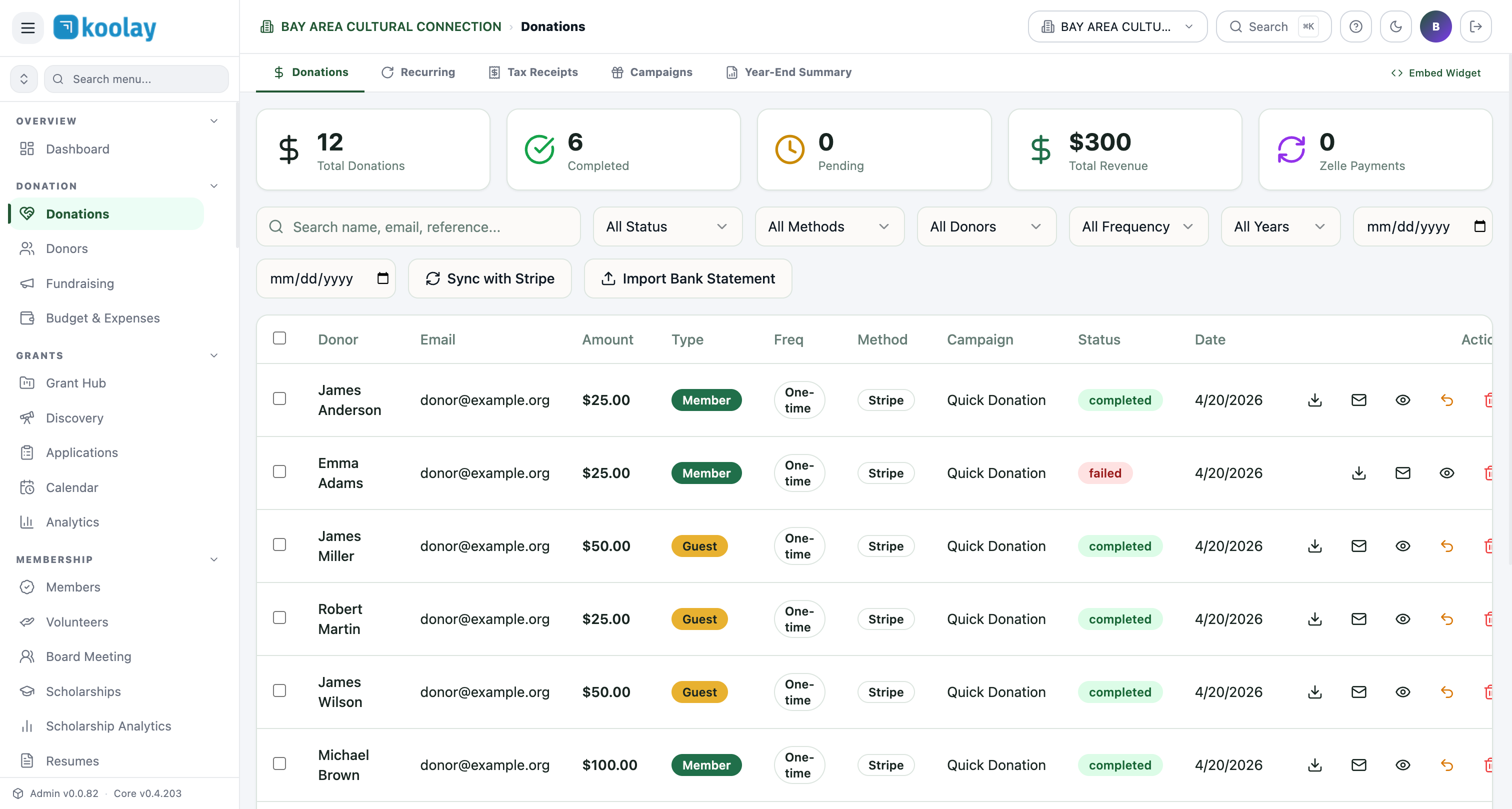
The five summary tiles
Across the top:
- Total Donations — count of every donation row, regardless of status.
- Completed — count of donations that successfully cleared payment.
- Pending — held by Stripe (rare; usually ACH transfers in flight).
- Total Revenue — sum of completed donations, in dollars.
- Zelle Payments — count flagged as Zelle. Zelle doesn't send webhooks, so these are typically reconciled manually.
The toolbar — finding a specific donation
Donor support is half of fundraising. Use the toolbar:
- Search by name, email, or Stripe reference (
pi_…orch_…). - Status filter —
completed,failed,refunded,pending. - Methods — Stripe, PayPal, Zelle, Manual.
- Donors — Member, Guest, or specific named donors.
- Frequency — One-time, Monthly, Yearly.
- Date range — from/to.
Combine filters: e.g. "all failed donations in October via Stripe" tells you what to follow up on before month-end.
What each row shows
Per donation: donor, email, amount, type (Member vs Guest), frequency, payment method, campaign, status, date, and a row-level action menu.
Row actions:
- Download Receipt → branded PDF with your logo and EIN.
- Email Receipt → send the same PDF to the donor.
- View → full detail panel (notes, custom fields, payment metadata).
- Refund → triggers a Stripe refund; status updates to
refunded. - Delete → only available for failed/manual rows; never delete a real charge.
The four tabs
- Donations — what you see by default; every donation row.
- Recurring — only the active monthly/yearly subscriptions, with next-charge dates.
- Tax Receipts — yearly summary receipts, broken out per donor for IRS purposes.
- Campaigns — donations grouped by campaign (e.g. "Annual Gala 2026", "Year-End Match").
- Year-End Summary — generates the annual giving statement that donors love to download in January.
- Embed Widget — code snippet to embed your donate form on a third-party site.
Importing donations Koolay didn't capture
If a donor mailed a check or sent Zelle, you have two options:
- Sync with Stripe — pulls any missing Stripe charges. Useful after transient webhook failures.
- Import Bank Statement — upload a CSV from your bank; Koolay matches names and emails to existing donors and queues unmatched rows for manual review.
Refunds
Refunds are processed through Stripe and can take 5–10 business days to land back on the donor's card. The donation row updates to refunded immediately and the donor receives an automatic email confirming the refund.
Common patterns
- Daily reconciliation — at the end of each day, glance at Pending and follow up on anything stuck >48 hours.
- Monthly board pack — export by date range to CSV, drop into your reporting deck.
- Year-end — use Year-End Summary to generate per-donor tax statements in bulk; donors get an email with a download link.