
Google Ad Grants
Google gives qualified U.S. nonprofits $10,000/month ($120,000/year) of free Google Ads spend through the Google Ad Grant program. Koolay's Google Ads panel walks you through applying, staying compliant, and running effective campaigns.
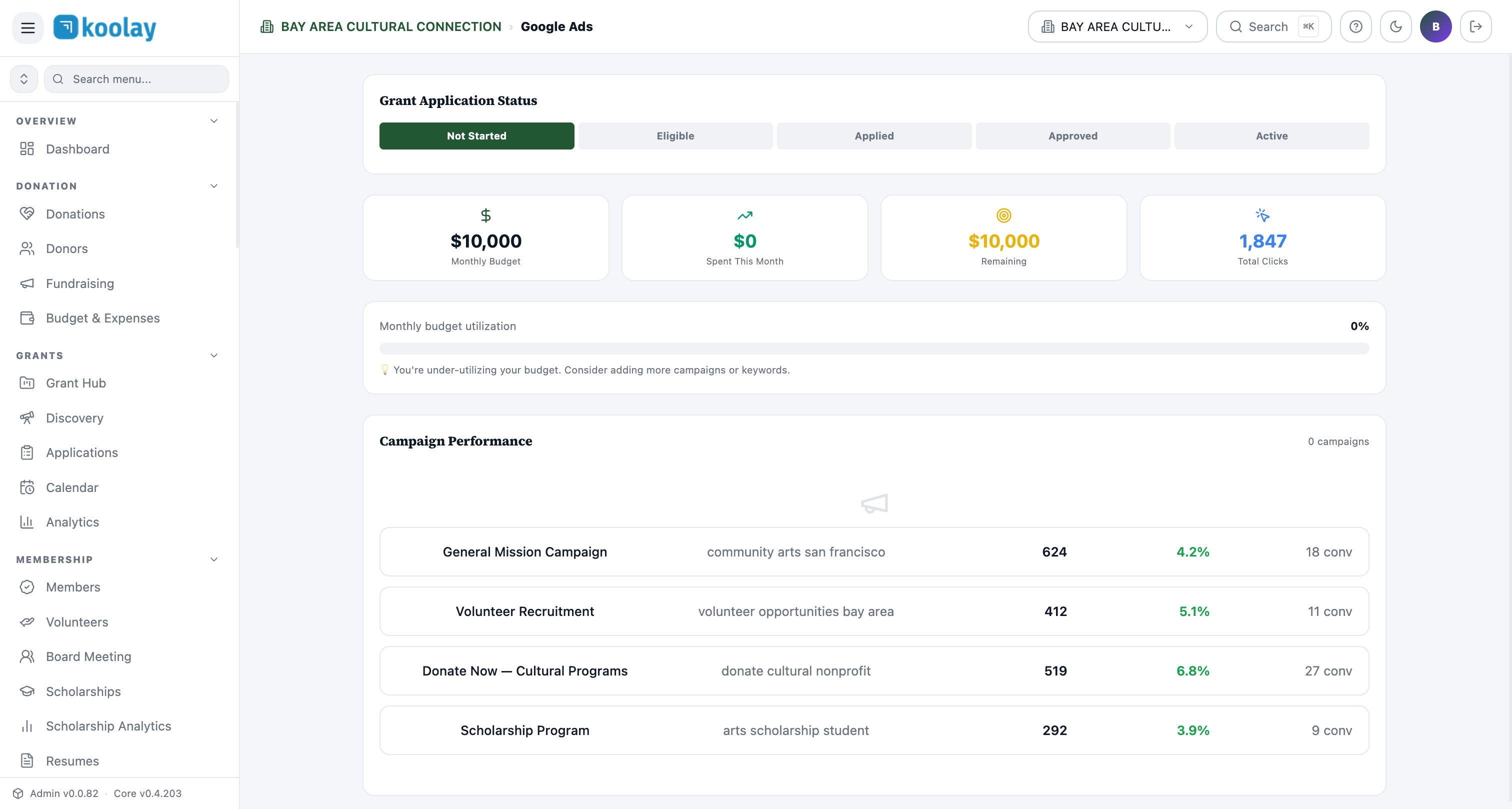
Application status
The dashboard shows where you are in the application journey:
- Not Started — haven't applied yet.
- Eligible — verified eligibility, not yet applied.
- Applied — application submitted to Google.
- Approved — granted; you have $10K/month to spend.
- Active — actively spending and running campaigns.
Click any state to see the actions needed to advance.
Eligibility
You must be:
- A registered 501(c)(3) U.S. nonprofit.
- Verified through TechSoup (Google requires this).
- NOT a hospital, medical group, school, university, or government entity (these have separate Google for Education / Google for Healthcare programs).
- Have an existing website that meets quality guidelines (no broken links, descriptive content, HTTPS).
Click Eligibility in the panel — Koolay runs an automated quality check on your site and tells you what to fix before applying.
Application guide
Step-by-step walkthrough of the Google Ad Grants application:
- Get TechSoup verified (~$0, takes 1–2 weeks).
- Sign up at Google for Nonprofits.
- Activate Google Ads in your nonprofit account.
- Submit the Ad Grant application.
- Wait 3–10 business days for Google to review.
Each step has detailed instructions, links, and a "I did this" checkbox.
Compliance monitoring
Google has strict compliance rules for Ad Grants. Violations can suspend your account. Koolay monitors automatically:
- CTR > 5% — your ads must maintain a 5% click-through rate, account-wide. Below 5% triggers a warning.
- Quality score — average keyword quality score must stay ≥3 (out of 10).
- No single-word keywords — except brand terms.
- No overly generic keywords — ("free stuff" is forbidden).
- Conversion tracking — must be enabled and meaningful.
- Active campaigns — at least 2 active campaigns and 2 active ad groups.
The Compliance tab shows green / yellow / red for each rule with specific fixes.
Campaign templates
Pre-built campaigns optimized for nonprofits:
- General mission — broad keywords matching your work.
- Volunteer recruitment — "volunteer in [city]" type queries.
- Donate now — high-intent donation keywords.
- Specific program — per-program landing pages.
- Event promotion — short-burst campaigns around events.
Click Use template to deploy. Templates pre-fill keywords, ad copy, landing pages, and conversion tracking — all compliant.
Performance metrics
Once active, you'll see:
- Spent this month vs. Remaining.
- Total clicks — clicks driven to your site.
- Monthly budget utilization — aim for 60–80%; under 50% triggers Google's "under-utilizing" warning.
- Per-campaign performance — clicks, CTR, conversions.
Settings
- Conversion goals — define what counts as a conversion (donation, newsletter signup, volunteer form submission). Required for compliance.
- Tracking pixel — Google Ads tag, auto-installed on your Koolay site.
- Budget alerts — email when spending falls below or above thresholds.
Common patterns
- Apply early — even before your site is "perfect". Google reviews quality but is forgiving for new nonprofits.
- Conversion tracking is non-negotiable — without it, Google will eventually suspend the account.
- Refresh keywords quarterly — search trends shift; check and prune.
- Don't try to spend all $10K — that's a stretch goal. Most nonprofits land at $4–7K/month, which is still huge.